

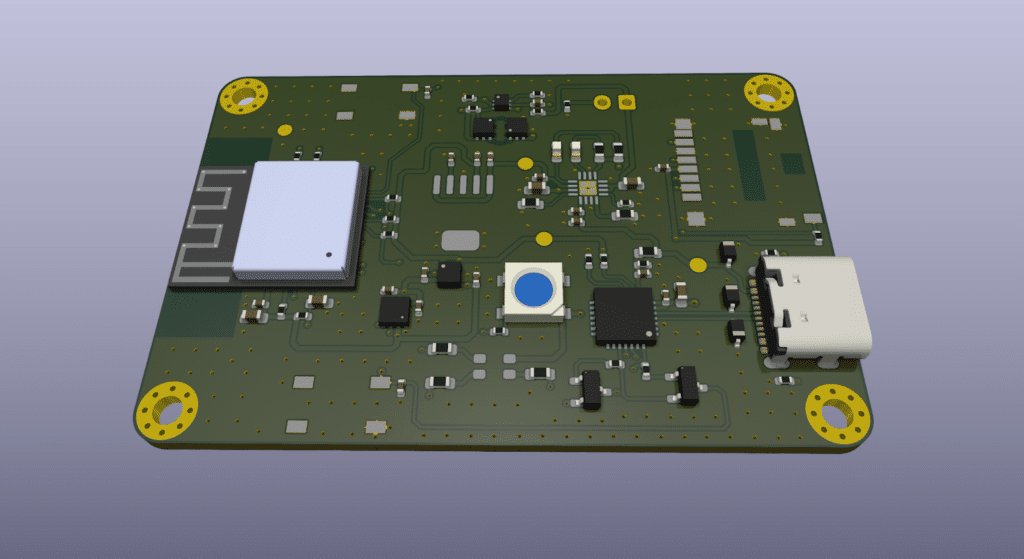
It all started on a typical Monday morning. I was sitting at my desk, coffee in hand, feeling pretty proud of myself. I had just finished designing the schematics, power distribution, circuit layout, and PCB for a development board my company would be using, which we had named Node.IO.
If you’re a hardware designer, you know that feeling, the one where you’ve triple-checked every connection, ensured all your components are in place, and your traces are clean and neat. That feeling where you think, “Yes! This design is flawless. Nothing can go wrong now.”
Ah… how wrong I was.
I had designed Node.IO to be a versatile development board for our projects. Everything looked great on paper: the power rails were properly distributed, the ICs were connected correctly, and the PCB layout followed good practices. I even felt confident that once I sent it to production, it would work the first time. Spoiler alert: perfection is a myth in PCB design.
Before taking the final step, I decided to run my design through CADY software, a tool I had been curious about for a while. I wasn’t expecting miracles; I just wanted a quick sanity check.
What happened next? Let’s just say CADY quickly reminded me that my ego needed a reality check.
The first alert CADY threw at me was related to the ESP32-C3 microcontroller I had used. According to CADY, this MCU was “no longer recommended for new designs.” Wait… what?
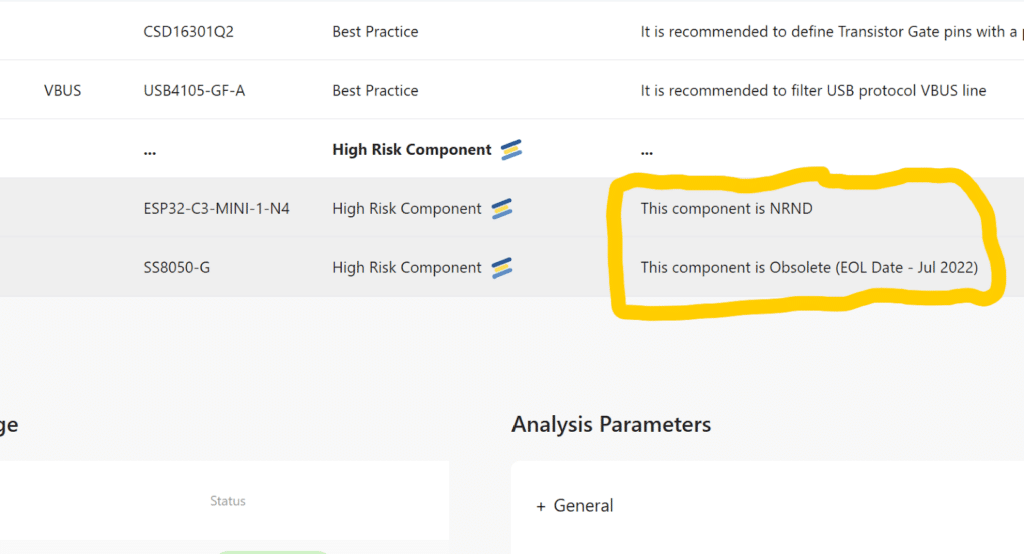
I blinked. I double-checked the datasheet, then went straight to Mouser Electronics to confirm. And sure enough, CADY was right; the MCU I had chosen was outdated for new projects. I had no idea. I could almost hear my future self screaming at me from the manufacturing floor.
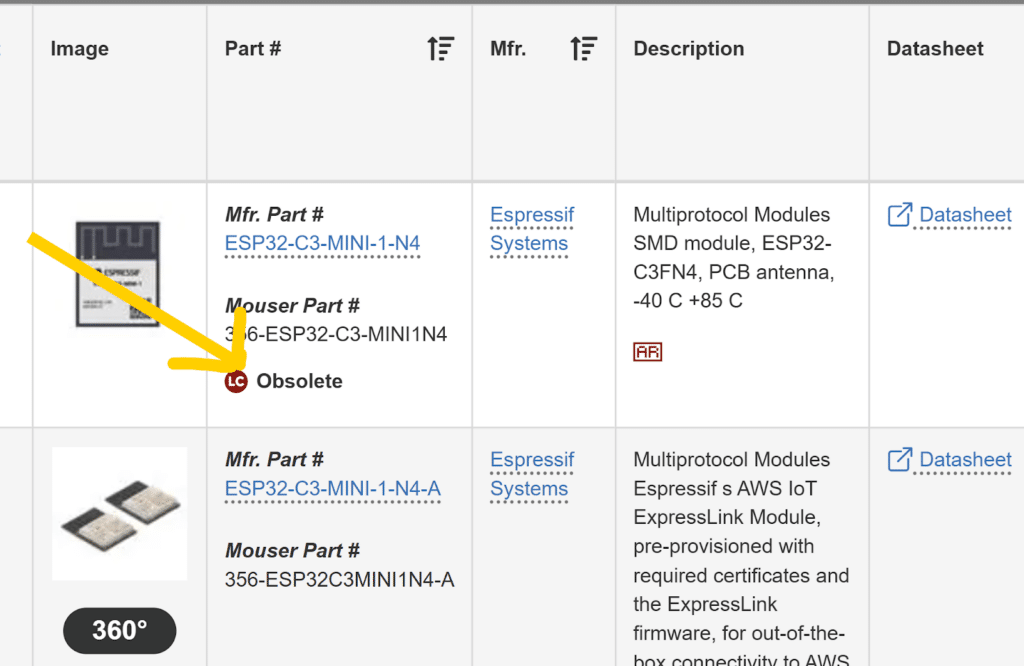
Thanks to CADY, I was able to swap out the ESP32-C3 for the latest version and update my BOM before it was too late. That was lesson number one: always, always check your components before production, even if you think you know them.
Next up, CADY flagged my SS8050-G transistor. It had reached its End-of-Life (EOL) status. I stared at the screen, trying not to spill my coffee. Seriously? How did I miss that?
Had I ignored this, I might have gone ahead and used a component that would soon be unavailable. The result? Production delays, redesigns, and an angry engineering manager asking why our boards weren’t working. CADY saved me from what could have been an expensive, time-consuming disaster.
Then came the icing on the cake, a diode issue. CADY flagged one of the diodes, and I had to dig a little deeper. After reviewing the datasheet, I realized the power I was supplying, +3.3V, was actually below the diode’s operating voltage range of +3.7V to +5.5V.
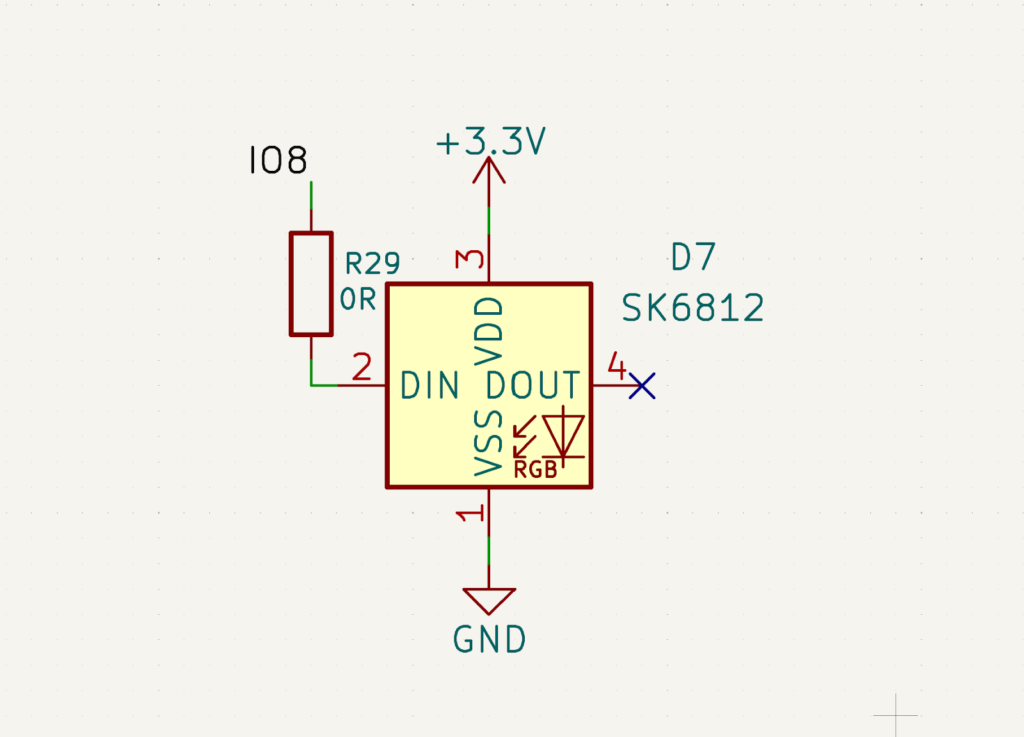
Imagine the scene: me, staring at my own design, muttering, “Why is this always happening to me?”
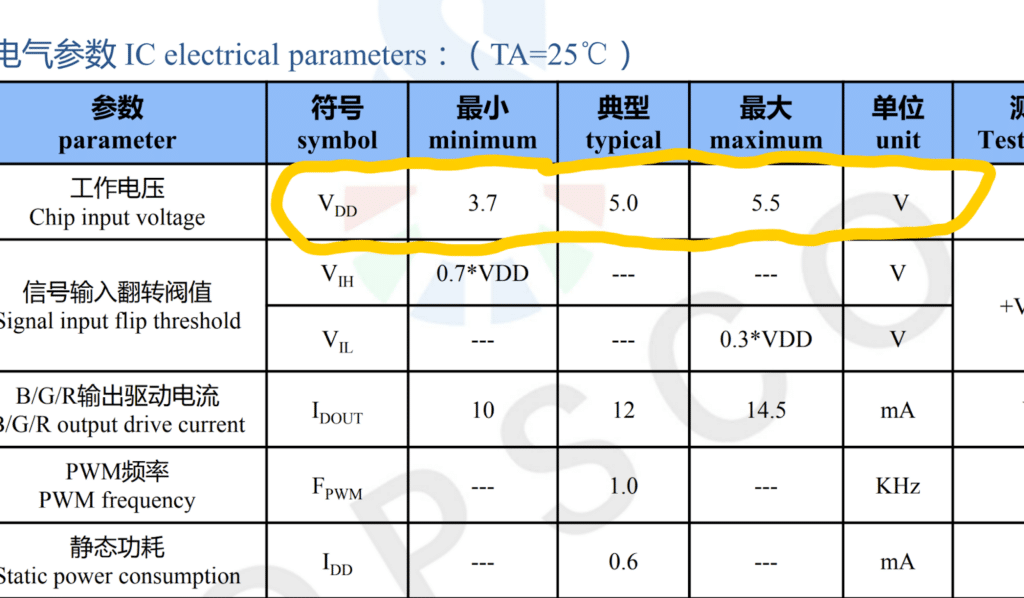
Thanks to CADY, I caught it before production, giving me the chance to restructure my design and make sure everything was actually aligned with the component requirements. No more guessing, no more hope-and-pray testing, just solid, reliable design.
By the time I finished addressing these three issues, I realized something important. CADY didn’t just highlight errors; it taught me something about my own design habits. It made me more conscious about checking the lifecycle status of components, reviewing operating ranges carefully, and considering availability and sourcing before finalizing the BOM.
In short, CADY had transformed a “good enough” design into a production-ready design that actually works. And the best part? I saved time, money, and avoided countless headaches.
For engineers, circuit designers, and even companies, this is huge. Think about it. How many times have you gone through a full PCB design cycle only to find a critical component is obsolete or unavailable? How many hours of testing and debugging could have been avoided if you caught simple errors earlier? How much money could you save by making the right component choices the first time?
CADY addresses all of these issues before you ever send your design to production. It’s like having a senior engineer reviewing your work 24/7, but without the attitude or the coffee breaks.
Here’s what makes CADY particularly powerful:
- Spotting obsolete or End-of-Life components. This is a game-changer. No more finding out after production that your transistor, IC, or microcontroller is impossible to source. CADY gives you the heads-up early so you can make a better choice.
- Validating operating conditions. Voltage, current, and other electrical parameters matter. CADY checks your design against component specifications and highlights mismatches, like my diode that needed more voltage. Catching this early saved me from potential failures in the field.
- Optimizing your BOM. CADY helps you ensure every part is not only correct but also practical to source. This reduces costs, avoids delays, and streamlines your production process.
- Improving design reliability. The more errors you catch before production, the fewer headaches later. CADY helps structure your design so everything is in the right place, components are compatible, and your PCB has the highest chance of working perfectly the first time.
I can honestly say that CADY changed how I approach PCB design. Before, I would finish a design, double-check a few things, and hope it worked in production. Now, I have a systematic way to catch errors I wouldn’t have noticed otherwise.
It’s not just about saving money, although that’s huge. It’s about saving time, reducing stress, and building better products.
So if you’re an engineer designing circuits, whether it’s development boards, IoT devices, or complex PCBs, consider this. CADY can help you catch errors early, choose the right components, and avoid costly mistakes.
In my case, it turned Node.IO from a “good design that might work” into a production-ready board that I trust will work reliably. I avoided redesigns, replaced obsolete parts, fixed voltage mismatches, and ensured the BOM was accurate, all before production started.
And honestly, it was kind of fun seeing CADY catch things I had missed. It’s like having a slightly sarcastic friend who points out, “Uh, I don’t think that’s going to work, buddy.” And trust me, engineers need friends like that.
The bottom line: a good design isn’t just about making the circuit work on paper. It’s about making it practical, reliable, and cost-effective. Tools like CADY help you do that, giving you confidence that when your board hits the production line, it will work as intended.
