

An American aerospace manufacturer ran two complex boards through CADY at the final schematic stage.
CADY flagged a reset pull-up resistor below its datasheet minimum, two reset nets with no capacitor to ground, and a voltage regulator not rated for the product’s -40°C operating environment.
The design team marked every finding “Need to fix” and corrected the schematics before fabrication, so the errors never made it onto a physical board.
Who Was the Customer?
The customer is a US aerospace manufacturer that joined CADY as an early adopter in 2022, about a year before the platform’s commercial release.
The team shared the full schematics of two complex boards and provided detailed feedback on every item in CADY’s analysis report.
Aerospace hardware is a demanding test case.
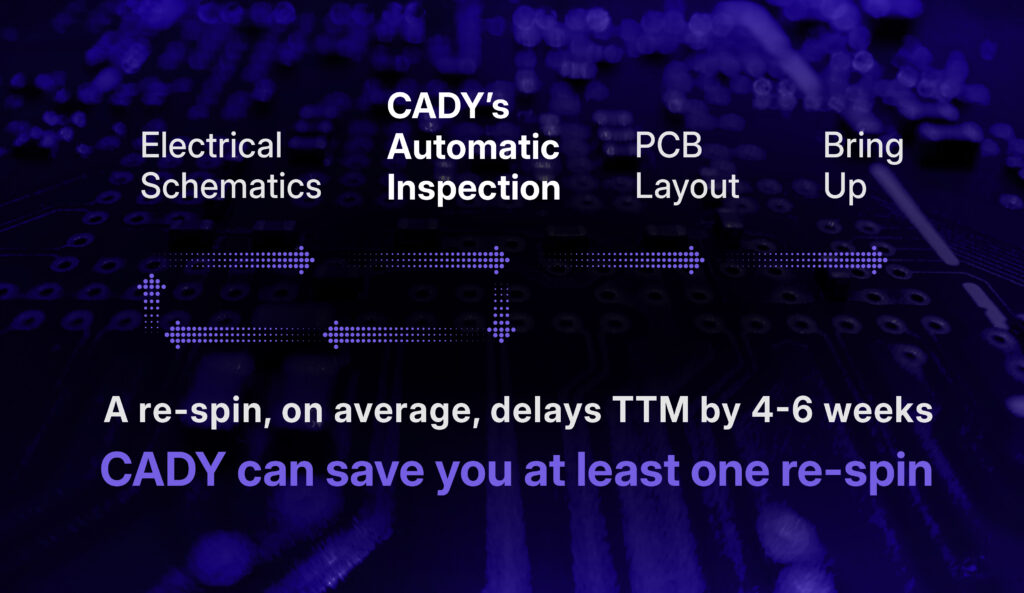
Boards have to hold up across wide temperature ranges, and a missed component limit found after fabrication can mean a board re-spin, a delayed program, or a field failure.
Why Do Errors Like These Slip Past Manual Review and DRC?
Most schematic checking still relies on engineers manually comparing each component against its datasheet.
On a dense board, that means hundreds of parts and thousands of pins, and small limits such as a minimum resistor value or an operating temperature grade are easy to miss late in a project.
Rule-based tools help, but they only check what their rules and component libraries describe.
Siemens’ Xpedition Valydate (Mentor Graphics, which built Xpedition, became part of Siemens in 2017 and now operates as Siemens EDA) checks nets against a component model library built from the BOM’s manufacturer part numbers.
CADY takes a different route.
It reads each component’s datasheet directly, extracts requirements such as pin voltage ranges, recommended external parts, and temperature ratings, and checks the netlist and BOM against them, with no library setup or user input required.
What Were the Two Critical Errors?
CADY found one critical issue on each board, plus a related reset-circuit warning on the first.
Board 1: Was the Reset Pull-Up Resistor Sized Correctly?
No, it was below the datasheet minimum.
CADY matched the TI TPS3808G125QDBVRQ1 supervisory circuit in the netlist and BOM.
From the datasheet, it inferred that pin 1 (RESET#) is an open-drain output that needs a pull-up resistor in the 10 kΩ to 1 MΩ range.
The schematic did include a pull-up on that pin, but its value was below 10 kΩ.
A pull-up that is too strong forces the reset output to sink more current than intended and can stop the line from reaching a clean logic low, which risks unreliable resets across the system.
This is the kind of value-level detail a connectivity check passes, because the resistor is present and connected.
For background on sizing these parts, see our guide to pull-up and pull-down resistors in digital circuits.
Board 1: Were the Reset Nets Protected From Noise?
No. A separate CADY check found two reset nets with no capacitor to ground.
Without a small filter capacitor, a reset line is more exposed to noise and glitches that can trigger unwanted resets.
The designer marked both findings “Need to fix” and added capacitors to the two nets.
Board 2: Was the Voltage Regulator Rated for the Operating Environment?
No, the part could not operate at the low end of the required temperature range.
The design used a TI UA78M33CKVURG3 3.3 V linear regulator.
CADY read its operating range from the datasheet as 0°C to 125°C.
The product’s specified ambient range was -40°C to 85°C.
CADY flagged that the regulator was not rated for anything below 0°C, which is a serious gap for aerospace hardware.
The designer marked the finding “Need to fix” and replaced the component.
TI also offers an industrial grade of the same regulator, the UA78M33IKVURG3, rated from -40°C to 125°C, which shows how a single suffix in a part number can decide whether a board survives its environment.
For more on choosing and using these parts, read linear regulators in modern circuit design.
How Did CADY Find These Issues?
The team uploaded two files per board: the netlist exported from their ECAD tool and the BOM.
CADY matched each part number to its datasheet, used natural language processing and image processing to pull out the relevant requirements, and checked every connected component against them.
The results arrived as an interactive report.
Each finding links back to its datasheet source, and engineers mark it “Need to fix” or “Skip” (for intentional design choices or insignificant items).
The How to Use CADY guide shows how to export a netlist from Siemens Xpedition, DxDesigner and PADS, Cadence OrCAD, Altium, KiCad, Eagle and Zuken.
What Were the Results?
| Finding | Component | What CADY flagged | Designer action |
|---|---|---|---|
| Reset pull-up below minimum | TPS3808G125QDBVRQ1 | Pull-up on RESET# under the 10 kΩ datasheet minimum | Marked “Need to fix” |
| Missing reset capacitors | Reset nets, Board 1 | Two reset nets with no capacitor to ground | Added capacitors |
| Temperature rating mismatch | UA78M33CKVURG3 | Rated 0°C to 125°C vs. -40°C to 85°C design range | Replaced component |
All three findings were caught at the final schematic stage and fixed in the design files, before any board was fabricated.
Across this early-adopter engagement, average finding accuracy was about 80%.
The remaining findings were false positives, which engineers could quickly dismiss using the datasheet references in the report.
Since then, the platform has matured, and CADY now reports around 90% overall accuracy with a 2-3% false negative rate.
The pattern also holds beyond this customer: more than 65% of projects CADY has analyzed included at least one finding the designer marked “Need to fix”.
What Does This Mean for Your Next Board?
Errors like these are rarely dramatic in the schematic.
A resistor is present but slightly undersized, or a regulator is the right voltage but the wrong temperature grade.
They become expensive only once the board is built.
Agentic, datasheet-driven review catches these value-level and rating-level issues in minutes, while changing a schematic still costs almost nothing.
You can see similar results in our Babyark main board case study, where CADY flagged six critical errors, and in How CADY Saved My Node.IO Development Board.
If you are checking a design built from a vendor example, our guide on using reference designs effectively covers what to verify.
Catch Critical Errors Before Your Next Re-Spin
Your next board does not have to wait for a lab failure to reveal a datasheet mismatch.
Upload your netlist and BOM to CADY and get a full schematic analysis report covering 1,000+ custom-built rules, with high-density designs of 20K+ pads analyzed in minutes.
No libraries, no configuration, and no manual data entry.
Your files are encrypted, never permanently stored and never used to train models, and CADY is ISO 27001 certified.
Start Analyzing for Free or Talk to the CADY Team about your design.
Working on a confidential project? Sign up and try Demo Mode first.
Frequently Asked Questions
What is a board re-spin and why does it matter?
A re-spin is a redesign and refabrication of a PCB after errors are found in a built board. It adds new fabrication and assembly costs, repeats testing, and pushes back program schedules. In aerospace and other regulated industries, the delay can be significant, which is why catching errors at the schematic stage, before fabrication, is far cheaper than fixing them later.
How is CADY different from a Design Rules Check (DRC)?
A DRC checks a design against predefined rules and component libraries. CADY reads component datasheets automatically and extracts requirements such as pin voltage ranges, recommended pull-up values and temperature ratings, then checks your netlist and BOM against them. That lets it find value-level and rating-level errors that rule-based checks often pass without needing any library setup.
Which ECAD tools does CADY support?
CADY is platform-agnostic. It supports netlists from Siemens Xpedition, DxDesigner and PADS, Cadence OrCAD, HDL and Concept, Altium, Zuken, KiCad and Eagle. Supported netlist formats include Protel 2, Quick View Connections (.qcv) and OrCAD (.dat). You also upload a BOM as a .csv, .xlsx or .xls file with a manufacturer part number for each reference.
How long does a CADY schematic analysis take?
Setting up an analysis takes about five minutes: export your netlist, upload it with your BOM and start the run. Processing takes from a few minutes to a few hours depending on board complexity, and you are notified when the report is ready. Reviewing the concise, interactive report typically takes no more than 30 minutes.
Is it safe to upload confidential aerospace or defense designs?
CADY does not permanently store netlist or BOM files and does not train its models on customer data. Data is encrypted in transit and at rest, and the company holds ISO 27001 certification. CADY can sign an NDA, offers a premium hybrid on-premise option on request, and provides Demo Mode for teams that cannot upload a live design.
What types of errors can CADY detect?
CADY detects a wide range of schematic issues, including incorrect or missing pull-up resistors, missing filter capacitors, pin voltage mismatches, component temperature rating conflicts, connection integrity problems, and communication protocol issues. Teams can also add their own organizational rules so every design is checked against internal best practices, not only datasheet requirements.

